


Overview: ★★★★★ “Painting has never been so easy, the ink engine is fantastic, lines are looking smooth, the feeling is amazing”
Requirements: Android Device OS 2.2 and up
Price: $3.12
Download:
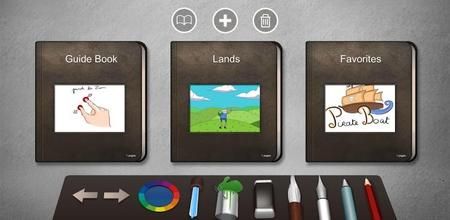
This is a Drawing application that let you sketch and paint with water colors, feather, pencil, brushes…
The engine is Really Fast ! There is No delay between the touch and the following line.
✓ The engine is customizable, you have all the control over the drawing line, which means : Size, Opacity, Smoothing and Thickness Factor.
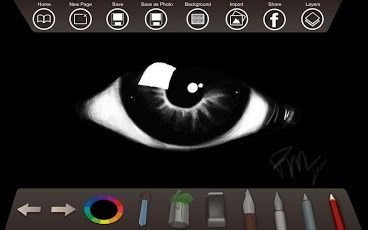
✓ A selection of 6 drawing tools let you do just what you want.
✓ Drawing, painting, coloring, sketching, writing, all these are possible with Paperless.
You can save your works and classify them in books and pages with a super simple drag/drop & add/remove navigation.
✓ New layers feature is now set. 3 layers are available and ready to use. Toggle visibility and adjust Layer Opacity. It’s preserve the transparency on each layer.
✓ You can zoom in & out and drag with two fingers to navigate inside your drawing.
✓ With the brush tools you can paint by using simple brush, blurry brush or even watercolor.
✓ You can adjust the size, the opacity, the thickness according to the speed and even the smoothness of the curve.
✓ The ink pen allow you to hand write, take notes, with a smooth ink design.
Fill an area with the selected color in one touch with the paint bucket.
✓ The undo and redo let you go back and forth in the history of your action. You can go back up to 15 steps in the history.
✓ Choose your color according to the hue/saturation/brightness, a history of the last 6 colors can be picked and a nice selection of brightness variances is available.
✓ The color picker let you pick any color on the screen.
✓ You can save your drawing into the gallery as a photo.
✓ You can also import picture from your photo gallery such as your photo or a drawing that you saved earlier.
✓ You can share your works on Facebook.
✓ A selection of backgrounds/textures is available.
WARNING : You should not work with USB storage connected, because it blocks the save from the application, this may result in a loss of your drawing !
☛☛ Features ☚☚
- Full canvas, use all the screen space (designed for tablets use)
- 6 drawing tools
- Feather ink
- Painting brush : basic, blur, dirt…
- WaterColor Brush
- Pencil Brush
- Special ink pen for writing
- Eraser tool
- Paint bucket tool
- Color picker tool
- Preview for all tools
- Two finger zoom & drag
- Dynamic thickness
- Dynamic smoothing
- Control the thickness according to the speed
- Control the smoothness of your line’s curve
- Control the size of the brush
- Control the opacity
- Choose any color with hue/saturation/brightness
- History of 5 last colors
- Selection of 6 color variances
- 15 undo redo
- 12 backgrounds
- Share on Facebook
- Save to your gallery
- Save as PNG with transparency in storage
- Import any picture from your gallery
What’s New in Paperless – Draw, sketch, tablet version:
No recent changes info
https://play.google.com/store/apps/details?id=air.com.jeremieklemke.drawing
Download Instructions: Paperless – Draw, sketch, tablet 1.1.6 (Android)
http://ul.to/n63nizpk
http://clz.to/jxj1msr6
The post Paperless – Draw, sketch, tablet 1.1.6 (Android) appeared first on Megandroids.


